Closing Balance Report
To use this report, properties must contact Agilysys to configure the following dates based on which the report will be generated:
-
Property Start of Week - The day of the week that must be considered as the starting day for generating the report. Assume the day selected is Sunday and the report is generated on Tuesday, the Weekly column in the report will include data for Sunday, Monday, and Tuesday.
-
Property Start of Month - The date of the month that must be considered as the starting date for generating the report. Assume the date set here is 10, and the report is generated for December 19, the Monthly column in the report will include data from December 10 to December 19. If the report is generated for December 8, the report will include data from November 10 to December 08.
-
Property Start of Year Month - The month of the year that must be considered as the starting month for generating the report.
-
Property Start of Year Date - The date of the month in the year that must be considered as the starting date for generating the report. Assume the month selected is January and date set is 10. If the report is generated for December 19, the Yearly column in the report will include data from January 10 to December 19.
Report Parameters
|
Field |
Description |
|---|---|
|
Report Name |
The name of the report. |
|
Report Date |
The date for which the report must be generated. |
Sample Report
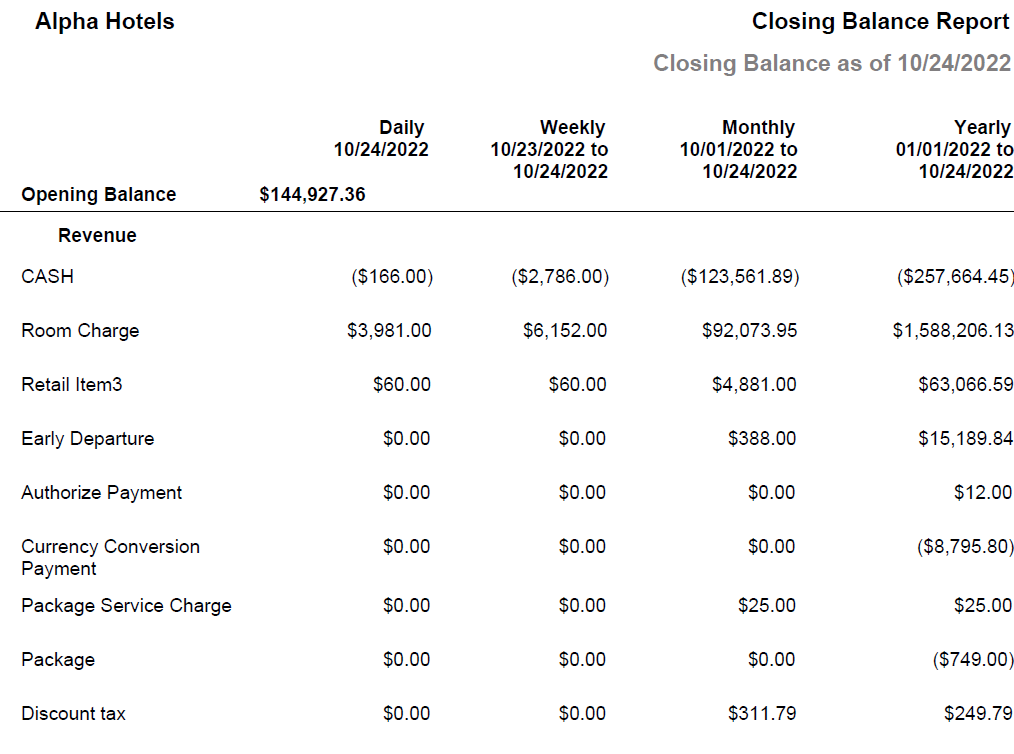
Report Fields
|
Field |
Description |
|---|---|
|
Opening Balance |
The balance at the beginning of the selected date. |
|
Daily |
The closing balance for the selected date. |
|
Weekly |
The closing balance from the configured start of the week to the day selected. |
|
Monthly |
The closing balance from the configured start of the month to the selected date. |
|
Yearly |
The closing balance from the configured month of the year and date of the month to the selected date. |